Memory Vault v1.0 is Released
For the past year I kept hitting the same wall. I'd have a real conversation with Claude — work through a database design, debug something gnarly, agree on a convention I wanted to keep — and the next morning it was gone. Not summarized. Not searchable. Just gone. ChatGPT was the same. Every assistant I used had the long-term memory of a goldfish, and the workaround the industry settled on was "paste the relevant context back in every time." That's not memory. That's me being the memory.
So I built one. Memory Vault is an open-source, self-hosted AI memory system you run yourself: Postgres with pgvector underneath, hybrid search on top, an MCP server so Claude can read and write to it directly, a knowledge graph that extracts entities without an LLM bill, a local LLM chat with retrieved-source citations, and a one-command Docker setup. Today it crosses the line from "build-in-public project" to "v1.0 stable release."
What Memory Vault is
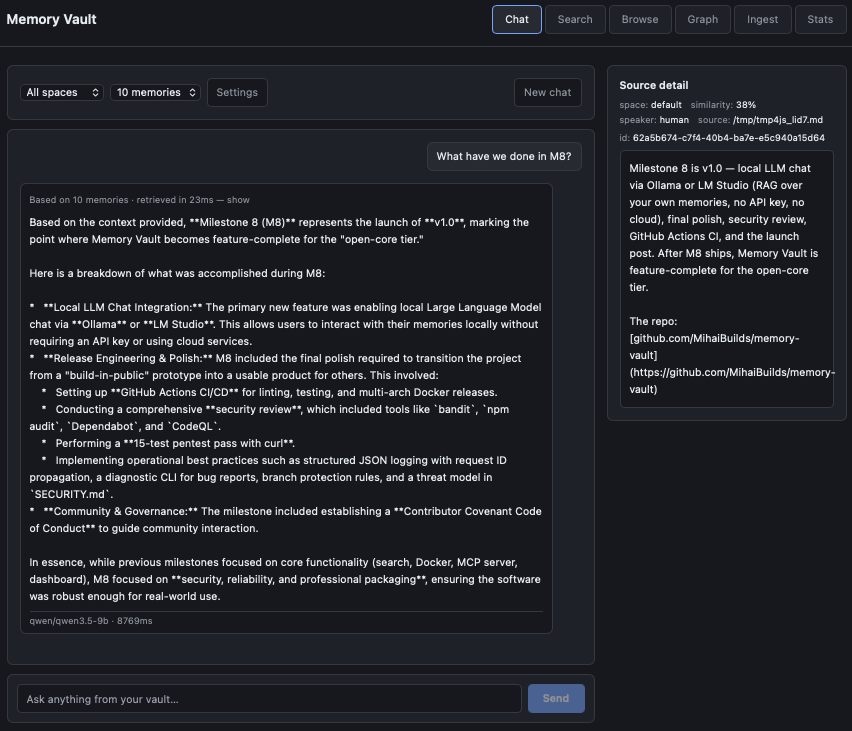
A long-term memory layer for AI assistants and the apps you build on top of them. You ingest text — markdown notes, conversation logs, anything plain — and it gets chunked, embedded, full-text indexed, and stored in a single Postgres database. Hybrid search (vector similarity + keyword tsvector + Reciprocal Rank Fusion) returns the right chunks back when you query. An MCP server exposes four tools (recall, remember, forget, status) that Claude Desktop or Claude Code can call directly, which means Claude can read and write to your memory inside any conversation without you copy-pasting context. A REST API exposes the same operations for any app you build. A dashboard gives you a Search, Browse, Graph, Ingest, Stats, and Chat page. A local LLM chat (LM Studio in v1.0) lets you talk to your memories with full source citations — every response shows which chunks it pulled from, clickable.
It runs entirely on your machine. No API keys. No cloud. No telemetry. Postgres on port 5432, the API on port 8000, dashboard on the same port. docker compose up and it's running.
What v1.0 actually does
- Hybrid search — pgvector HNSW for semantic + tsvector GIN for keyword + Reciprocal Rank Fusion to merge them. Vector-only search misses exact terms; keyword-only misses paraphrases. RRF gets both.
- MCP server — four tools (
recall,remember,forget,status) callable from Claude Desktop, Claude Code, or any MCP client. Claude reads and writes your memory in-conversation. - Knowledge graph — spaCy NER plus co-occurrence extracts entities (Person, Project, Tool, Concept) and
related_torelationships from every ingested chunk. No LLM, no per-token cost, rendered as an interactive Cytoscape force-directed graph. - Memory spaces — namespacing for different contexts (work, personal, projects). Per-space dedup; cross-space isolation by default.
- Local LLM chat — LM Studio native API with sources panel showing retrieved chunks for every answer. Killer differentiator: every response is grounded and the grounding is visible.
- REST API — bearer-auth-protected, OpenAPI-documented at
/docs, every operation the dashboard does is also a documented endpoint. - One-command Docker —
docker compose up. Postgres, the app, and the spaCy model bundled into a single image at build time, no first-run download. - Self-hosted, MIT-licensed — your data stays on your machine. The whole thing is yours.
- 163 tests passing — pytest with a real Postgres + pgvector service container, no mocks of the database.
Architectural decisions worth naming
Postgres + pgvector instead of a dedicated vector database. I run one database, not two. Operationally this matters more than the marginal performance of a purpose-built vector store at small scale. You already know how to back up Postgres. You already know how to monitor it. HNSW indexes plus tuned maintenance_work_mem and ef_search get you to "fast enough for hundreds of thousands of chunks on a laptop." When that stops being true, the migration path is sane. Until then, one database is the right answer for a self-hosted personal-memory tool.
Hybrid search instead of vector-only. Pure vector search is great at paraphrase and concept. It's bad at exact terms — model names, error codes, file paths, anything where the literal string is the signal. Memory Vault stores both an embedding and a tsvector for every chunk and merges the two ranked result sets with Reciprocal Rank Fusion. RRF is parameter-free, doesn't require score normalization, and consistently beats either approach alone on the kind of mixed queries real users actually type.
spaCy + co-occurrence for the knowledge graph, not an LLM. The default move in this space is to feed every chunk through an LLM and ask it for entities and relationships. It works. It also costs money on every ingest, couples your graph quality to whichever model you happened to pick, and requires API keys for a tool whose entire pitch is no API keys. spaCy's en_core_web_sm model plus a co-occurrence rule (two entities in the same chunk = a related_to edge, weighted by frequency) gets you a useful graph for zero per-ingest cost. The honest limits — English only, context-dependent NER, no fuzzy matching — are documented up front rather than masked.
MCP-first, not REST-first. Memory Vault was designed around the assumption that the primary user of this database is going to be Claude, not me. The MCP server isn't a wrapper around a REST API — it's a direct path into the same code that the REST API uses. Both are first-class. But the design starting point was "what does Claude need to call to make memory feel native," and then the REST API was the same operations exposed for human-driven apps. That ordering changes which tradeoffs are interesting.
The PoolClosed story
About a week before tag day, I added a CLI command called memory-vault diagnose. It bundles app logs, database logs, status output, OS info, and redacted environment into a zip file users can attach to bug reports. Foundation work. Paid for once. The kind of thing that makes every future bug report ten times higher signal-to-noise.
I shipped it. Then I ran the test suite. 163 passed, 52 errored. Every error was psycopg_pool.PoolClosed.
First instinct: probably an httpx lifespan thing. Modern httpx has changed how it handles ASGI lifespan events between minor versions. The test suite uses httpx.ASGITransport to drive the FastAPI app in-process, sharing a session-wide connection pool fixture. If the transport was firing shutdown events between tests, the pool would close mid-suite. There's a kwarg for this. I added lifespan="off" to the transport. TypeError: ASGITransport.__init__() got an unexpected keyword argument 'lifespan'. The kwarg doesn't exist in 0.28.x. Reverted.
Second instinct: walk the call graph. memory-vault diagnose calls into the CLI's _run_status helper to capture status output for the bundle. _run_status was implemented as asyncio.run(_cmd_status()) — directly calling the CLI's status function in-process. _cmd_status initializes a connection pool at the top of the function and closes it via a finally block at the end. Which is correct behavior for the CLI. It's also exactly what you don't want when something else in the same process — like a session-wide test fixture — already owns a pool that's mid-flight.
The fix was four lines. Replace the in-process asyncio.run with subprocess.run(["memory-vault", "status"]). The subprocess gets its own pool, lives its own lifecycle, exits cleanly, and the parent process's pool is never touched. 163 passed, 0 errored.
The lesson isn't about pools or fixtures specifically. It's that "obvious" fixes (changing the test transport config) and root causes (one function quietly tearing down state owned by a different function) live in different parts of the code. The lifespan="off" move would have masked the symptom in the tests and left the actual bug in the CLI, where users would have hit it. Almost the entire week's gap between "all my sub-steps look done" and "v1.0 is actually shippable" was the discipline of not bypassing this kind of thing when bypassing was easy.
What v1.0 doesn't do, on purpose
English-only NER. The bundled spaCy model is en_core_web_sm. Non-English content gets little to no useful entity extraction. Multilingual models exist; they're heavier and slower; they're a v1.1 question driven by real user demand, not a v1.0 must-have.
No fuzzy entity matching. "PostgreSQL" and "Postgres" are separate entities in the graph. No alias merging in v1.0.
No re-extraction on edit. If you re-ingest a corrected version of a chunk, the new entities are added but the old ones aren't cleaned up.
Single-user. v1.0 has bearer auth and one user behind it. The schema has owner_id and access_level columns from day one, but multi-user activation is part of the PRO tier.
LM Studio only for chat. Ollama and llama.cpp use the same OpenAI-compatible client architecture under the hood, but the only end-to-end-tested path in v1.0 is LM Studio. Ollama support is not in v1.0.
No multi-conversation history in chat. Single-thread chat. A v1.1 candidate based on whether real users ask for it.
These are deliberate trade-offs. Honest gaps documented up front build more trust than feature bullets that fall apart when someone actually tries them.
The open-core model
Memory Vault is and will always be MIT-licensed. The whole thing — search, MCP, graph, REST API, dashboard, local LLM chat, ingestion pipeline, the database schema, the Docker setup. You can run it on your machine. You can fork it. You can use it inside a commercial product. The free tier is genuinely useful — not a crippled demo of the paid tier.
A paid PRO tier is planned for teams: dedup with importance decay, conflict resolution and supersede chains, multi-user activation, additional adapters (PDF, web pages), automated encrypted backups, and a fuller dashboard with analytics. The PRO tier is genuinely paid features — operational tools that solo users on a laptop don't strictly need, and teams running shared knowledge bases really do. v1.x stays free forever. The split is honest by design.
What this took to build
Seven weeks of evenings and weekends across nine locked milestones, scope frozen on March 27. M1 was the announcement. M2 the core hybrid search. M3 the one-command Docker. M4 the MCP server. M5 the REST API. M6 the dashboard. M7 the knowledge graph. M8 — this one — was local LLM chat plus the polish, CI/CD, security review, and release engineering that turn a build-in-public project into something other people can actually use.
Two of those weeks were the kind of work nobody sees: structured JSON logging with request ID propagation, a diagnostic CLI that produces a redacted bundle for bug reports, GitHub Actions for lint and test and multi-arch Docker release, security audit (bandit, npm audit, Dependabot, CodeQL, plus a 15-test pentest pass with curl), Contributor Covenant Code of Conduct, threat model in SECURITY.md, branch protection rules, and the discipline to fix the actual root cause of a test failure instead of bypassing it. Unglamorous. Also the difference between v0.7 and v1.0.
What's next
Beyond. Memory Vault is the first product in a planned compounding stack — The Brain is the next layer, building agents on top of this memory infrastructure. The memory layer is the one that has to be solid first. Today it is.
Try it
git clone https://github.com/MihaiBuilds/memory-vault
cd memory-vault
cp .env.example .env
docker compose up -d
Open http://localhost:8000 and you're running.
- GitHub release page
- README and quick start
- MCP setup for Claude Desktop / Claude Code
- Questions and bug reports: GitHub Issues
- General discussion: GitHub Discussions
Credits
Three Postgres tuning tips landed during M6 and M7 that materially improved Memory Vault: @rivestack on maintenance_work_mem, ef_search as a runtime knob, and post-deploy cache warmup for HNSW indexes. The first ships in v1.0; we'll use the others when we get to them. Public credit, fair credit. Build-in-public works because builders with deeper expertise see what you're shipping and tell you what's wrong before production does.
Beta tester Inevitable-Way-3916 ran the dashboard early, asked the architecture questions that forced the ARCHITECTURE.md doc to exist, and put bulk ingest on the list. Thanks.
Follow along
- Twitter / X: @mihaibuilds
- Blog: mihaibuilds.com
- GitHub: github.com/MihaiBuilds/memory-vault