Memory Vault
Open-source AI memory for developers. Self-hosted, MIT-licensed, runs on your machine. v1.0 released 2026-05-07.
Get it on GitHub Read the launch post
What it is
A long-term memory layer for AI assistants and the apps you build on top of them. You ingest text — markdown notes, conversation logs, anything plain — and it gets chunked, embedded, full-text indexed, and stored in a single Postgres database. Hybrid search returns the right chunks back when you query. An MCP server lets Claude read and write your memory inside any conversation, no copy-paste. A REST API exposes the same operations for any app you build. A dashboard gives you Search, Browse, Graph, Ingest, Stats, and Chat pages.
It runs entirely on your machine. No API keys. No cloud. No telemetry. docker compose up -d and it's running.
What v1.0 does
- Hybrid search — pgvector HNSW for semantic + tsvector GIN for keyword + Reciprocal Rank Fusion to merge them. Vector-only search misses exact terms; keyword-only misses paraphrases. RRF gets both.
- MCP server — four tools (
recall,remember,forget,status) callable from Claude Desktop, Claude Code, or any MCP client. - Knowledge graph — spaCy NER plus co-occurrence extracts entities (Person, Project, Tool, Concept) and
related_torelationships from every chunk. No LLM, no per-token cost. - Memory spaces — namespacing for work / personal / projects / whatever. Per-space dedup; cross-space isolation.
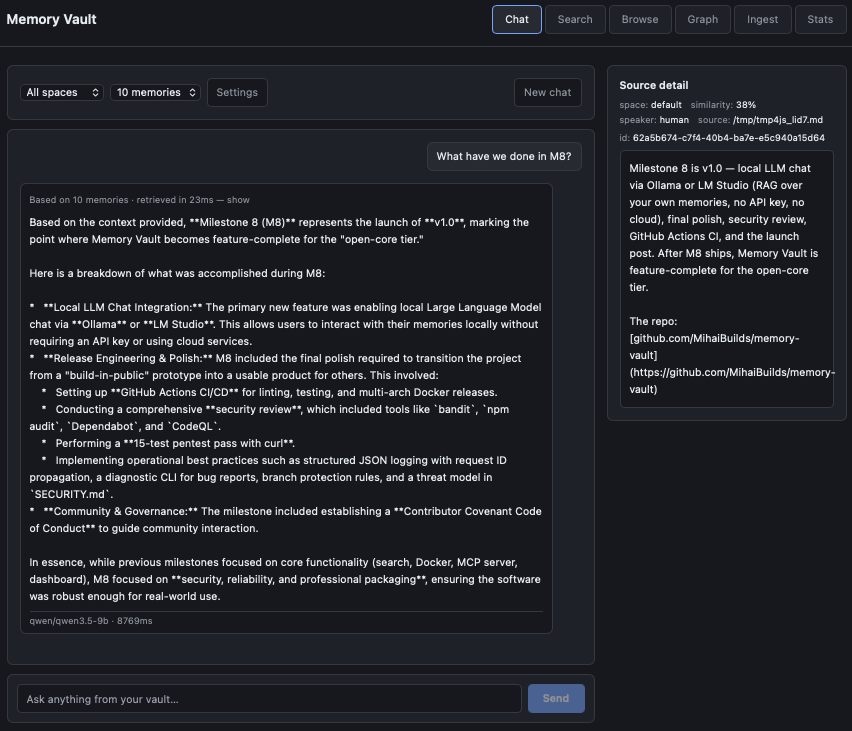
- Local LLM chat — LM Studio integration with sources panel showing retrieved chunks for every answer. Every response is grounded and the grounding is visible.
- REST API — bearer-auth-protected, OpenAPI-documented at
/docs. - One-command Docker — Postgres, the app, and the spaCy model bundled into a single image.
- 163 tests passing — pytest with a real Postgres + pgvector service container in CI.
Quick start
git clone https://github.com/MihaiBuilds/memory-vault
cd memory-vault
cp .env.example .env
docker compose up -d
Open http://localhost:8000 and you're running.
Architecture
One Postgres database, not two. HNSW for vector similarity, GIN for full-text. FastAPI on top, MCP server alongside it as a first-class path into the same code, React + Cytoscape dashboard, all in a single Docker image. The full architectural decisions are in the v1.0 launch post.
Honest limitations
- English-only NER — bundled spaCy model is
en_core_web_sm. Multilingual is a v1.1 question. - Context-dependent NER — same name can occasionally land as both Person and Project. No manual entity merging in v1.0.
- No fuzzy matching — "PostgreSQL" and "Postgres" are separate entities. No alias merging in v1.0.
- No re-extraction on edit — re-ingesting a corrected chunk adds new entities but doesn't clean up old ones.
- Single-user — multi-user activation is part of the paid PRO tier.
- LM Studio only for chat — No Ollama or llama.cpp support in v1.0.
Honest gaps documented up front build more trust than feature bullets that fall apart when someone actually tries them.
Open-core model
Memory Vault is and will always be MIT-licensed. The free tier — search, MCP, graph, REST API, dashboard, local LLM chat, ingestion pipeline, the whole thing — is genuinely useful, not a crippled demo. A paid PRO tier is planned for teams: dedup with importance decay, conflict resolution, multi-user activation, additional adapters (PDF, web pages), automated encrypted backups, fuller analytics dashboard. v1.x stays free forever. Open-core, not bait-and-switch.
Build journey
Memory Vault was built in public over seven weeks across nine locked milestones, starting March 27 2026. Each milestone shipped with a blog post explaining the technical decisions and trade-offs:
- M1 — The Announcement (2026-04-02)
- M2 — How Hybrid Search Works (2026-04-05)
- M3 — One Command Docker (2026-04-11)
- M4 — Give Claude a Long-Term Memory (MCP) (2026-04-12)
- M5 — Memory Vault Has a REST API (2026-04-16)
- M6 — Memory Vault Has a Dashboard (2026-04-21)
- M7 — Memory Vault Has a Knowledge Graph (2026-04-28)
- M8 — v1.0 Released (2026-05-07)
Try it
- Repo
- Latest release
- README and quick start
- MCP setup for Claude Desktop / Claude Code
- Questions and bug reports: GitHub Issues
- General discussion: GitHub Discussions
- Follow along: @mihaibuilds on X, blog